Create a project
Projects in Sembot are basic form of segmentation. They can be an eCommerce, market or groups of feeds. One project represents one store/market in which the store operates.
You can have as many projects as your chosen plan allows. Remember, you can always add extra projects to your plan in the section Choose plan.
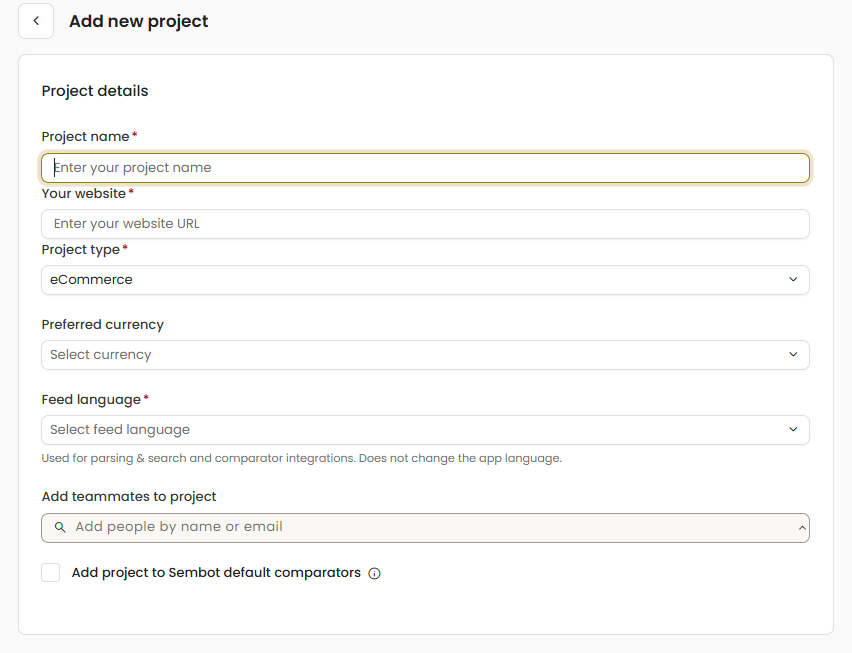
Click the Add Project button or the plus in the lower right corner and select Add Project.
Enter a project name. Tip: If you have different channels or markets, use a different name to distinguish them.
Enter your domain.
Select the project type: eCommerce and non-eCommerce – provide full access to all features. These project types are available in paid plans and count toward the project limit. CSS only – does not count toward the account’s project limit and is also available in the free plan. It allows you to add products to our comparison platform in order to gain additional advertising space.
Select a currency that matches the currency of your store's market.
Select the language of the product feed and click Save changes.
Add teammates to the project who will have access to it.
You can select whether the project should be automatically added to our comparison engine, you can then change it in the Feed tab.
Was this article helpful?
That’s Great!
Thank you for your feedback
Sorry! We couldn't be helpful
Thank you for your feedback
Feedback sent
We appreciate your effort and will try to fix the article